Every dollar gets a job.
Intro
Hundred is an investing app for people with their first real money: a first salary, a side gig, or both. Most investing apps are built to show you where you stand, a balance to check. But the decision that matters to someone starting out comes earlier, when a paycheck lands, and by default the answer is that it sits in checking until it’s spent.
So Hundred is organized around that moment. When money arrives, it suggests a job for every dollar (invest, a buffer for surprises, goals, taxes on gig income, and what you keep) and says why in one sentence. Nothing moves until you approve it.
I designed it end to end: the brand, sign-up, the member app, and how the AI behaves.
Role / Scope
Payday is the moment that matters.
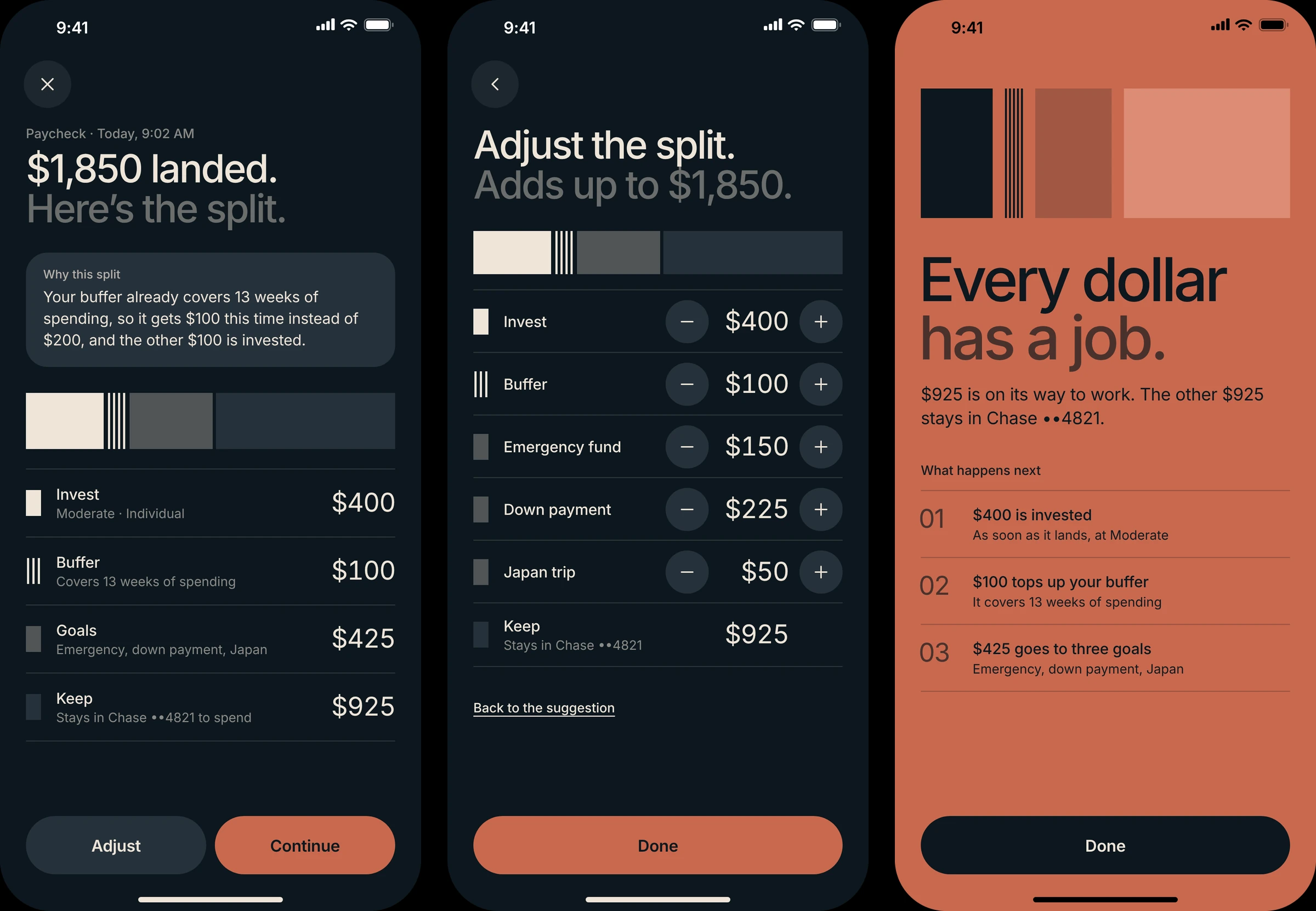
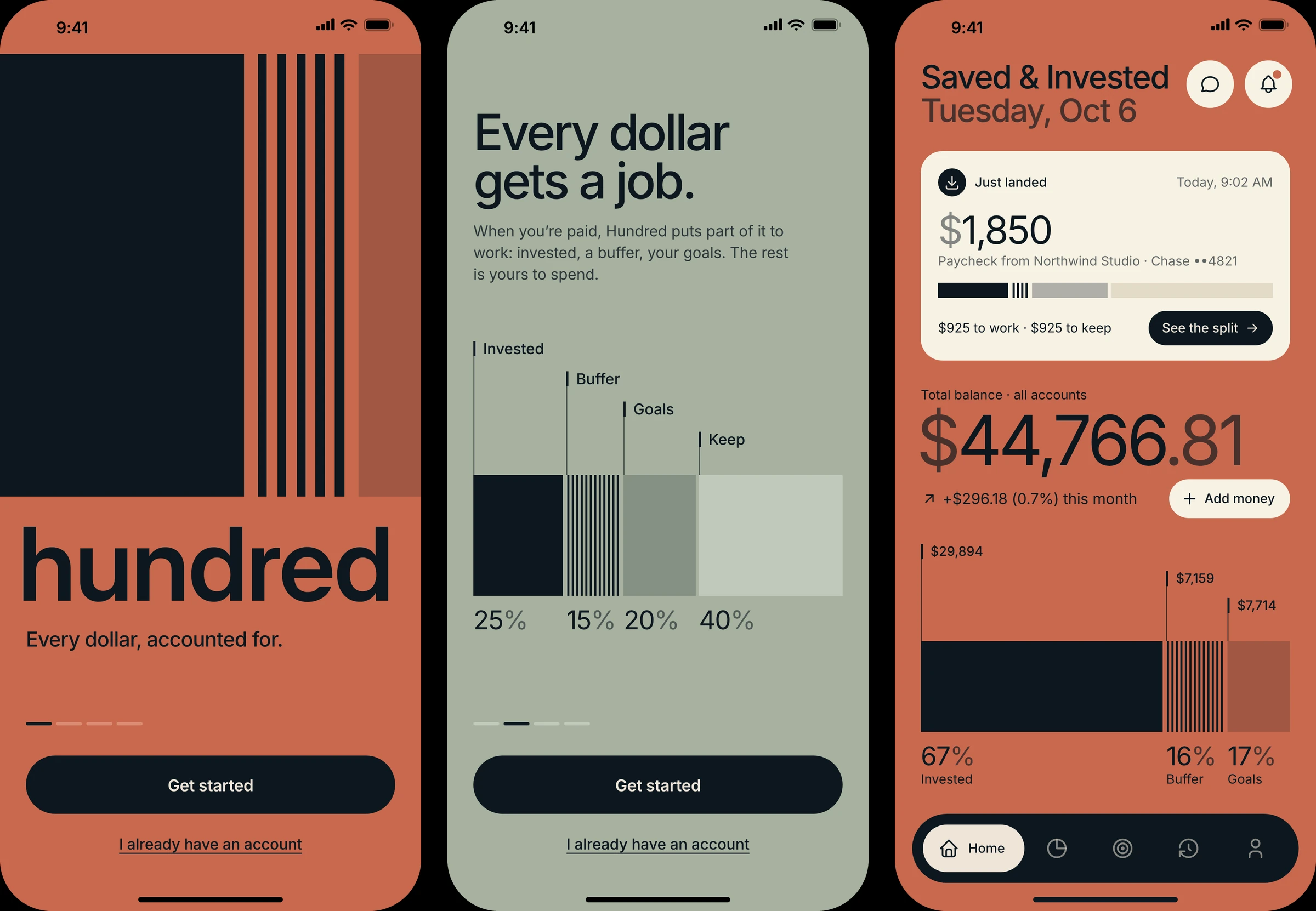
So Hundred watches for money landing in the linked bank account and labels it: paycheck, side gig or one-off. When a paycheck arrives, Home shows it at the top with a suggested split, drawn in the same columns as everything else, and one sentence says why. This time the buffer already covers 13 weeks of spending, so it gets $100 instead of $200, and the other $100 is invested.
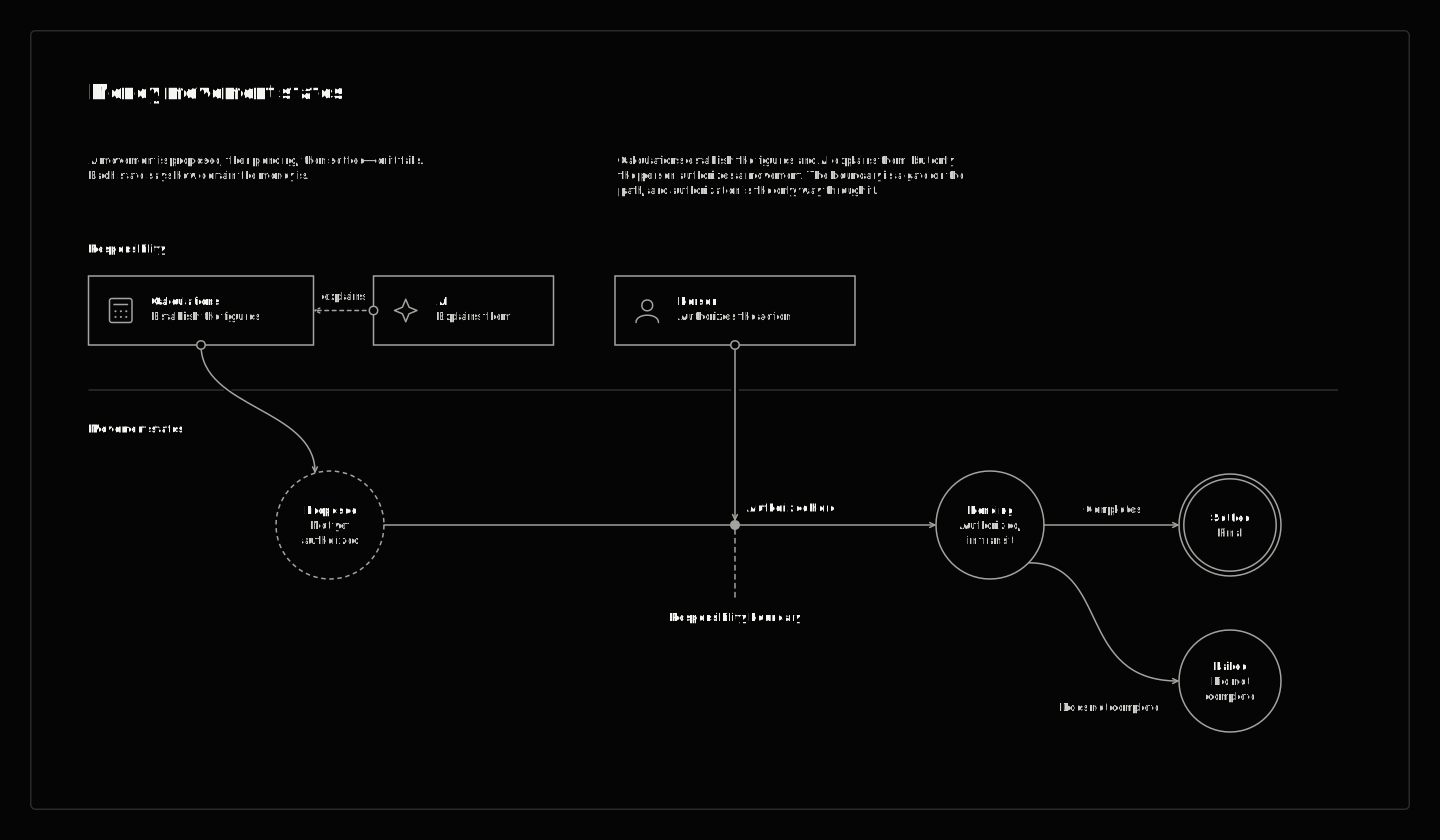
The member accepts the split or adjusts it, then approves one ticket with Face ID. Every paycheck waits for that approval. The only money that moves on a schedule is a recurring deposit the member set up and authorized once, like $500 on the first of each month.
In motion · payday
$1,850 lands. Open the split, move $50 to Invest and $50 to the Japan trip, and approve the ticket with Face ID. Back on Home, the money is on its way and the split is in Activity with its receipt.
Tradeoff: a suggestion that waits for approval is slower than autopilot. I chose one tap per paycheck over moving money on its own, because trust in a first investing app comes from seeing every move.
The split follows rules you can read.
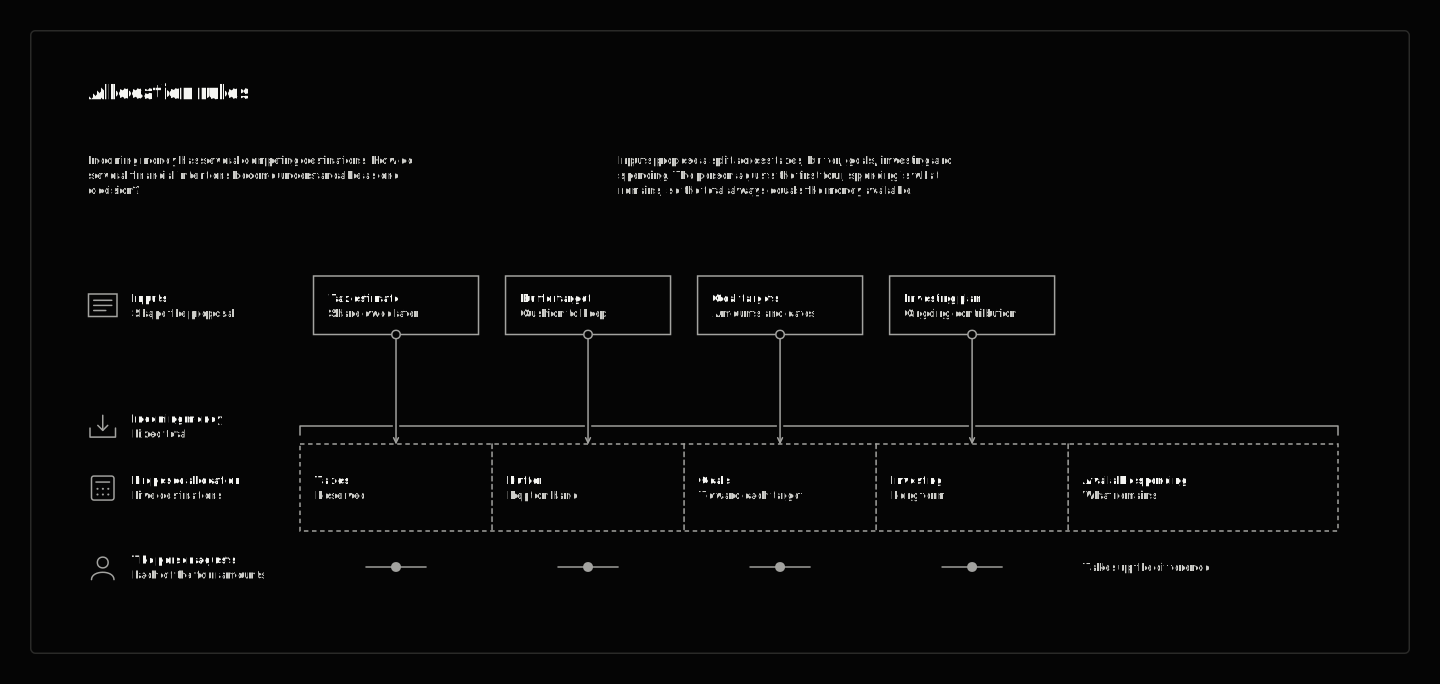
A suggestion is only worth approving if you can see where it came from. The split is written as a paycheck rule the member can read and edit in Account, under Split rules, and the AI only writes the one-line reason. The suggested amounts follow that rule for this paycheck; the totals, Keep and the limits on adjusting are calculated as the member changes them.
The income label decides which rule applies: a paycheck, a side gig (25% to taxes first) or a one-off, which gets no suggestion. For a paycheck, the buffer’s coverage sets its share: $200 until it covers 13 weeks of spending, then $100 until the 16-week target. It’s at 13 weeks, so it gets $100, and the $100 it stepped down goes to Invest. The existing goals draw their own amounts from the same paycheck, $425 together. Keep is the remainder, $925. It’s what’s left after the other parts, not an amount Hundred has checked against upcoming bills.

Two things gate the move. The member approves it, which gives permission to go ahead; it doesn’t prove the split is affordable. And the bank has to have the money available, or the whole split stops and nothing moves. Amounts adjust in $50 steps and Keep can’t go below zero, so the split always adds up to what landed.
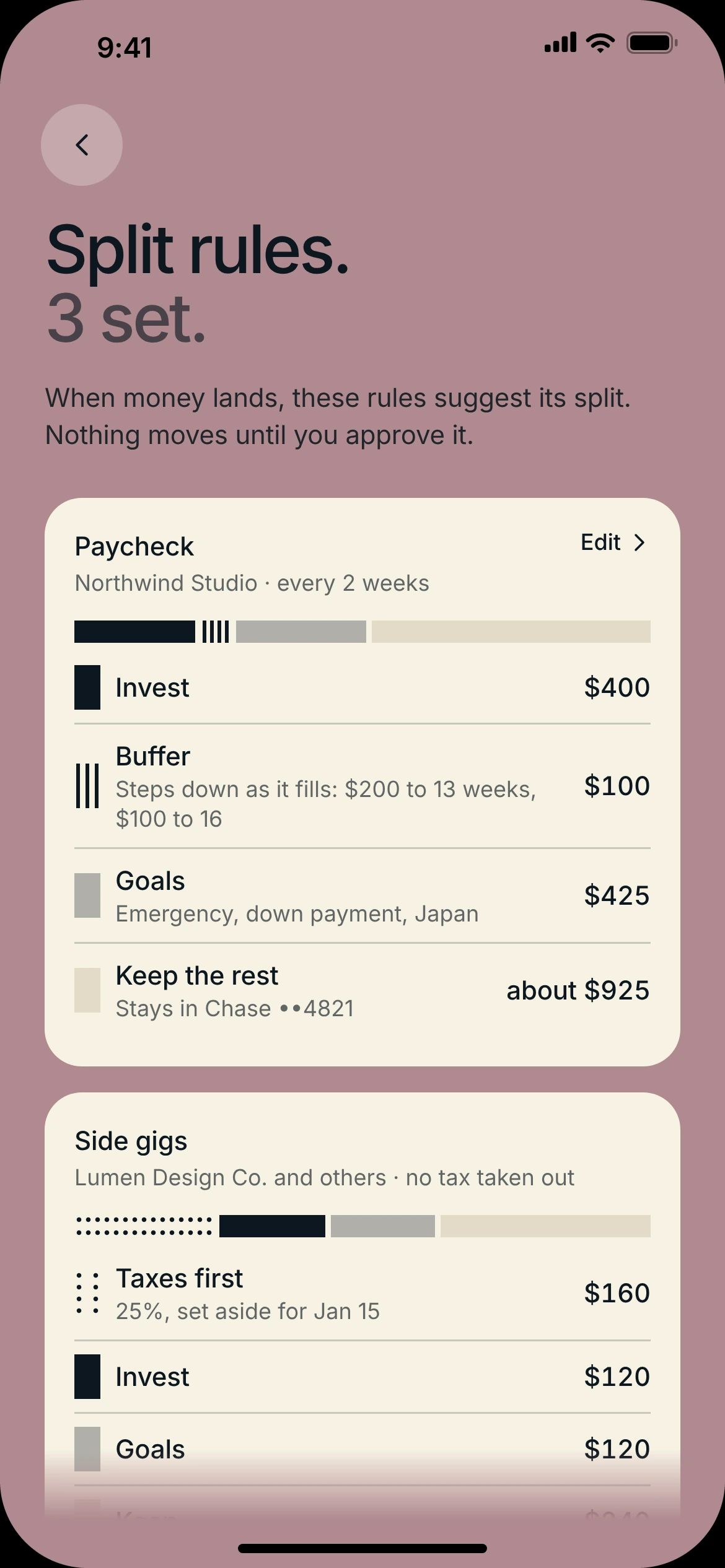
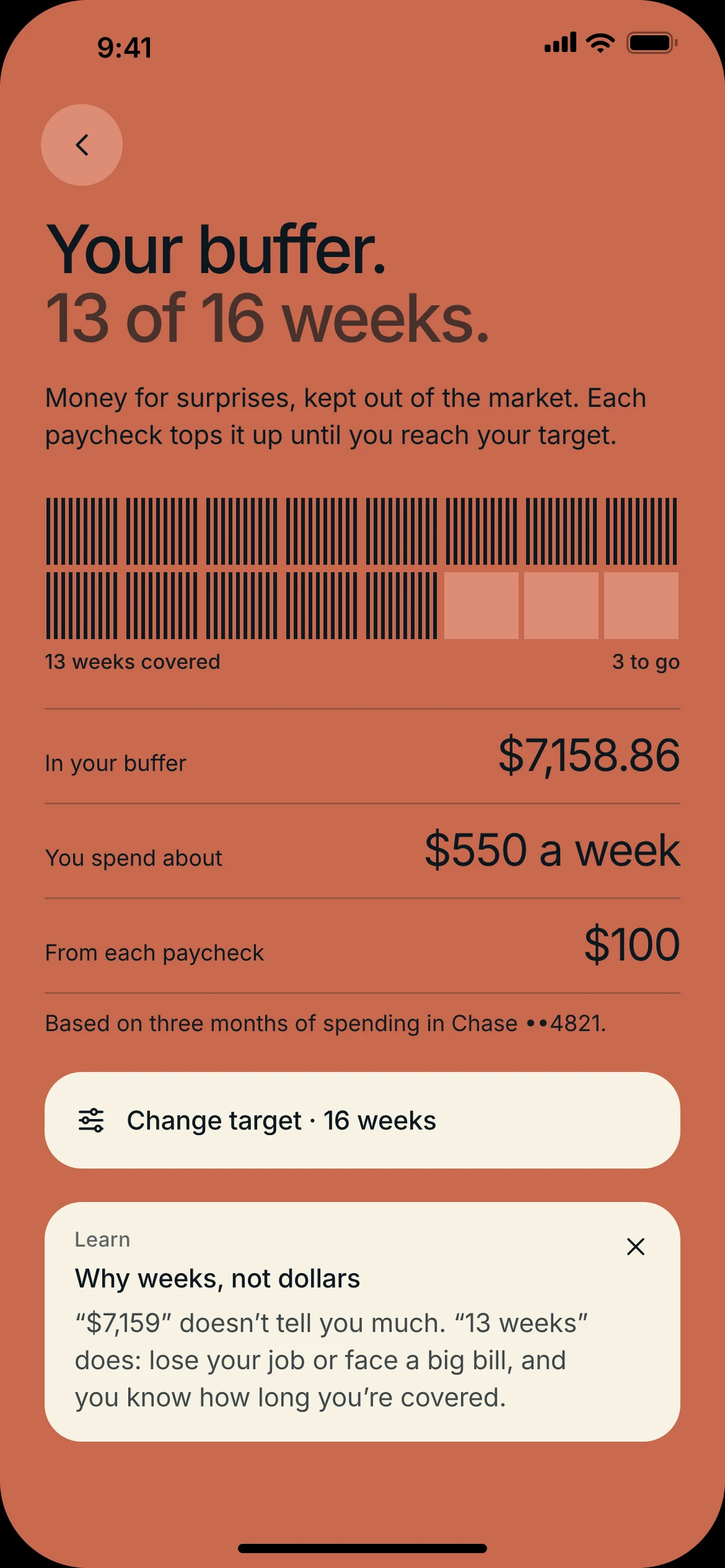
Split rules, where the member reads and edits the rule, and the buffer, counted in weeks of spending and hatched like all cash.
The buffer and the emergency fund overlap, and the product doesn’t fully separate them yet. As built, the buffer is uninvested cash counted in weeks of spending, and buys come out of it. The emergency fund is a goal the member named, with a dollar target and a date.
Tradeoff: a fixed rule is predictable but blunt. It doesn’t know what bills are coming, so protecting money that’s already spoken for is still an open product question, not something the split does today.
The logo is the chart legend.
The split only works if every dollar’s job reads at a glance, everywhere. So the brand mark carries the legend. Hundred’s mark is a square in three columns at 62 / 22 / 16: solid for invested, hatched for cash, a light tint for goals. It’s built from ratios, with a thirtieth of its width between columns, so the same rules draw it at any size and stretch it into the member’s own split on Home.
Payday added two more jobs. Taxes on side-gig income are dotted, because hatching only ever means cash. In the app the cash is called the buffer, and it’s measured in weeks of spending, not dollars. What you keep is drawn in the ground’s own lighter tone, the same tone as anything that isn’t there yet: it’s yours, not Hundred’s.
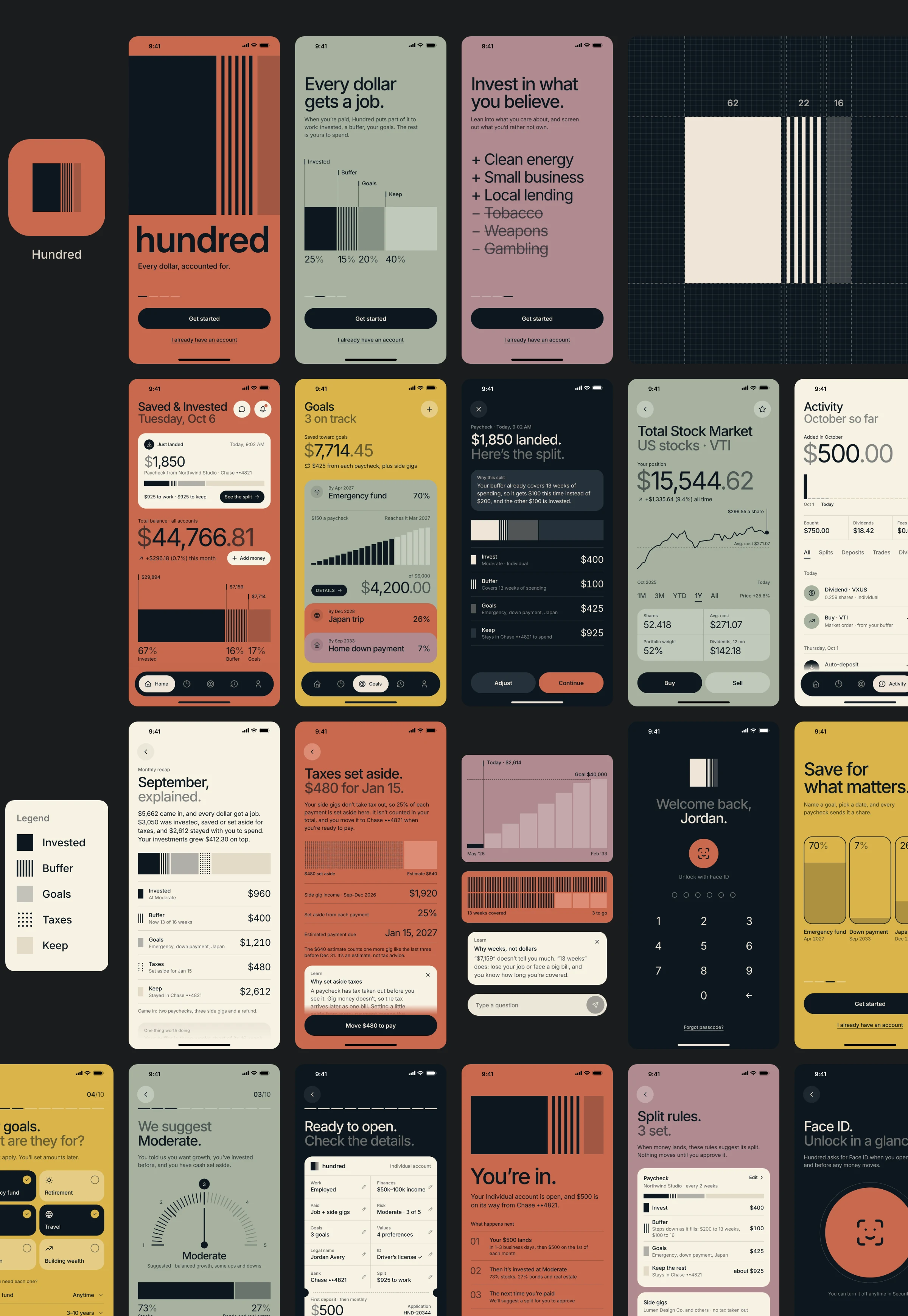
Tradeoff: the mark can’t be decorated freely. Recoloring it, or hatching something that isn’t cash, would break the legend everywhere else.
AI explains. It never picks.
Ask is one place to ask about your money. Tap the balance, a goal or the Ask button, and it can explain a change, check whether goals are on track, or teach a concept with your own numbers.
The rules came first. The money math is ordinary code: balances, goal dates, split amounts, tax set-asides. The model only talks, and every number it says comes from that code. Answers are drawn as the app’s own parts, a sentence plus a legend bar, a goal card or a teach card, and Show the math lists the arithmetic behind them. It never picks stocks, predicts markets or moves money. Asked to, it says no and teaches the idea instead. Each question sends only the numbers it needs. The AI settings list what Ask can see and what it never sees (the bank sign-in, the Social Security number, ID photos), with switches to turn off the split explanations or Ask itself.
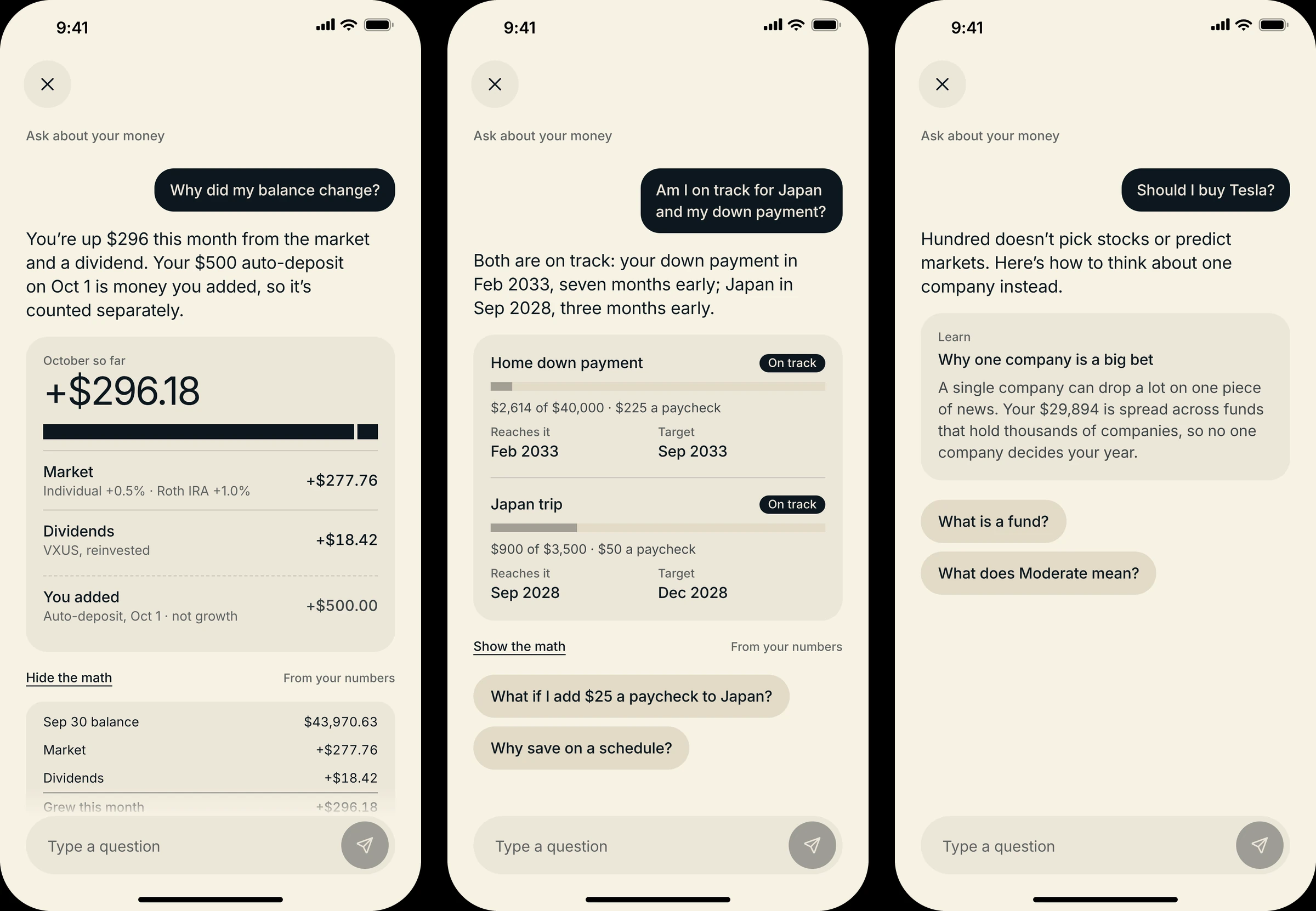
In motion · ask
Tap the balance and Ask starts with the question you’d have: why did it change? The answer separates the market from money you added, and Show the math lays out every number it used.
Tradeoff: some people want to be told what to buy. Hundred won’t, and says why. In a first investing app, being honest about what it can’t know matters more than sounding confident.
Lock the door before asking for the keys.
Opening an investment account asks for a lot: identity, income, a bank login, then money. The order matters as much as the questions. Asking for a Social Security number in an app that isn’t locked yet asks for trust it hasn’t earned.
So sign-in comes first and has no step count: email, a six-digit code instead of a password, a passcode, then Face ID. Only then do the ten steps start, beginning with the easiest questions about you.
In motion · sign-in setup
Email, a code that fills itself in, a six-digit passcode, then Face ID. The app is locked before it asks for anything sensitive, and step 1 starts with the easiest question.
Payday added two pages inside existing steps. Step 2 asks about finances as ranges, not exact figures: ranges are what the risk suggestion needs, and they’re quicker to answer and less personal. Its second page asks how you get paid, a paycheck, side gigs or both, which decides whether a taxes column exists at all.
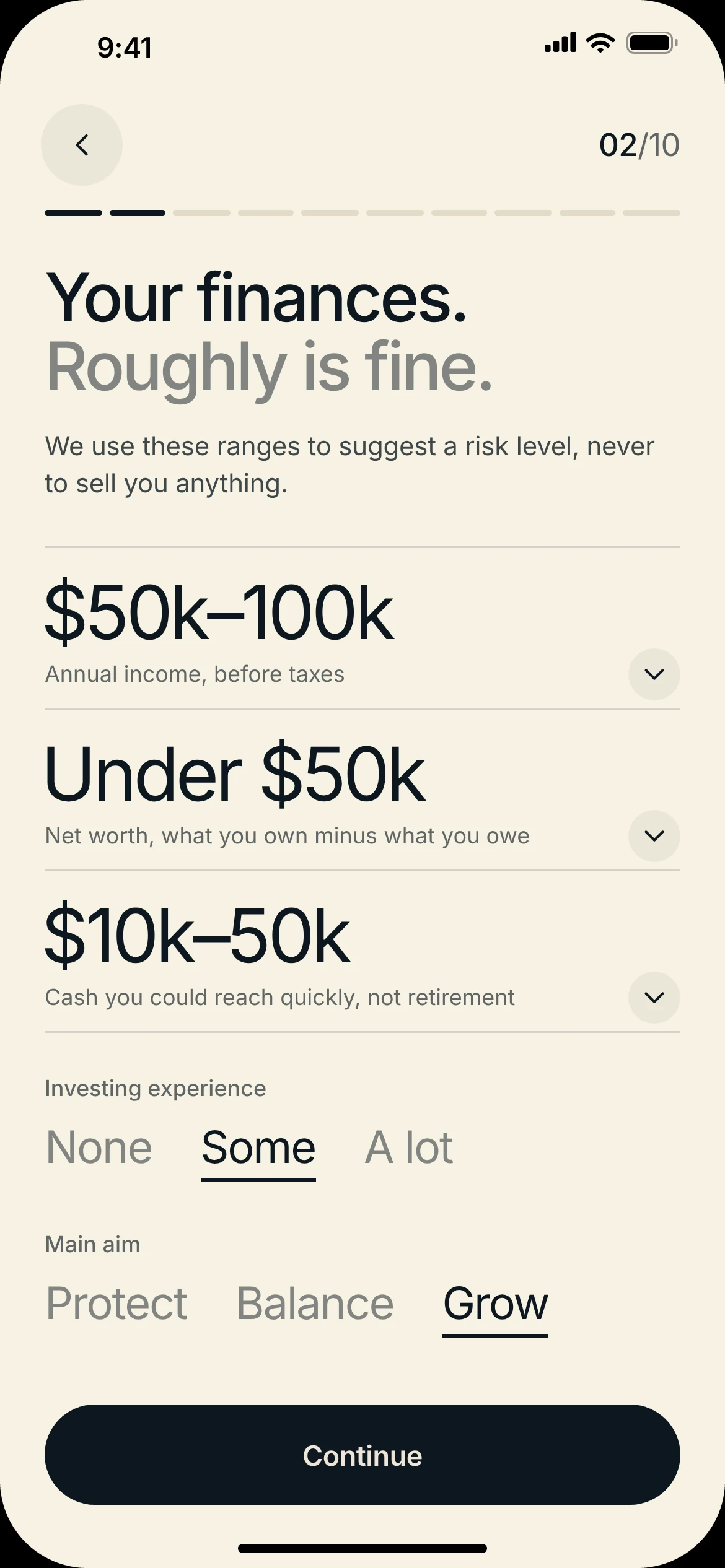
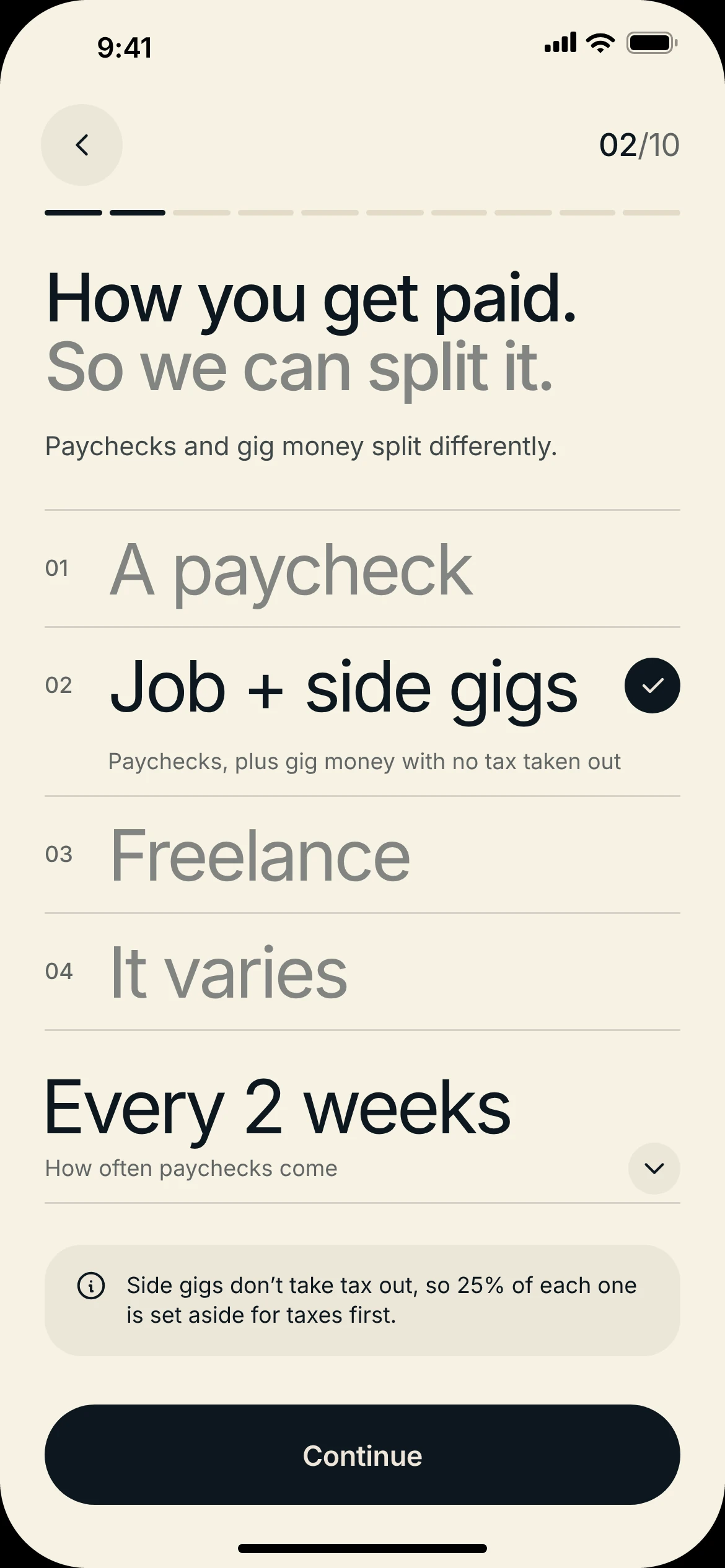
Step 2, both pages: finances as ranges, then how you get paid.
Risk isn’t a quiz. Hundred suggests a level, gives the reason from your answers, and lets you change it on a dial. And the last step ends with your first split, built from the paycheck Hundred found in your bank and shown before the account opens, so the first thing the app does is the thing it’s for.
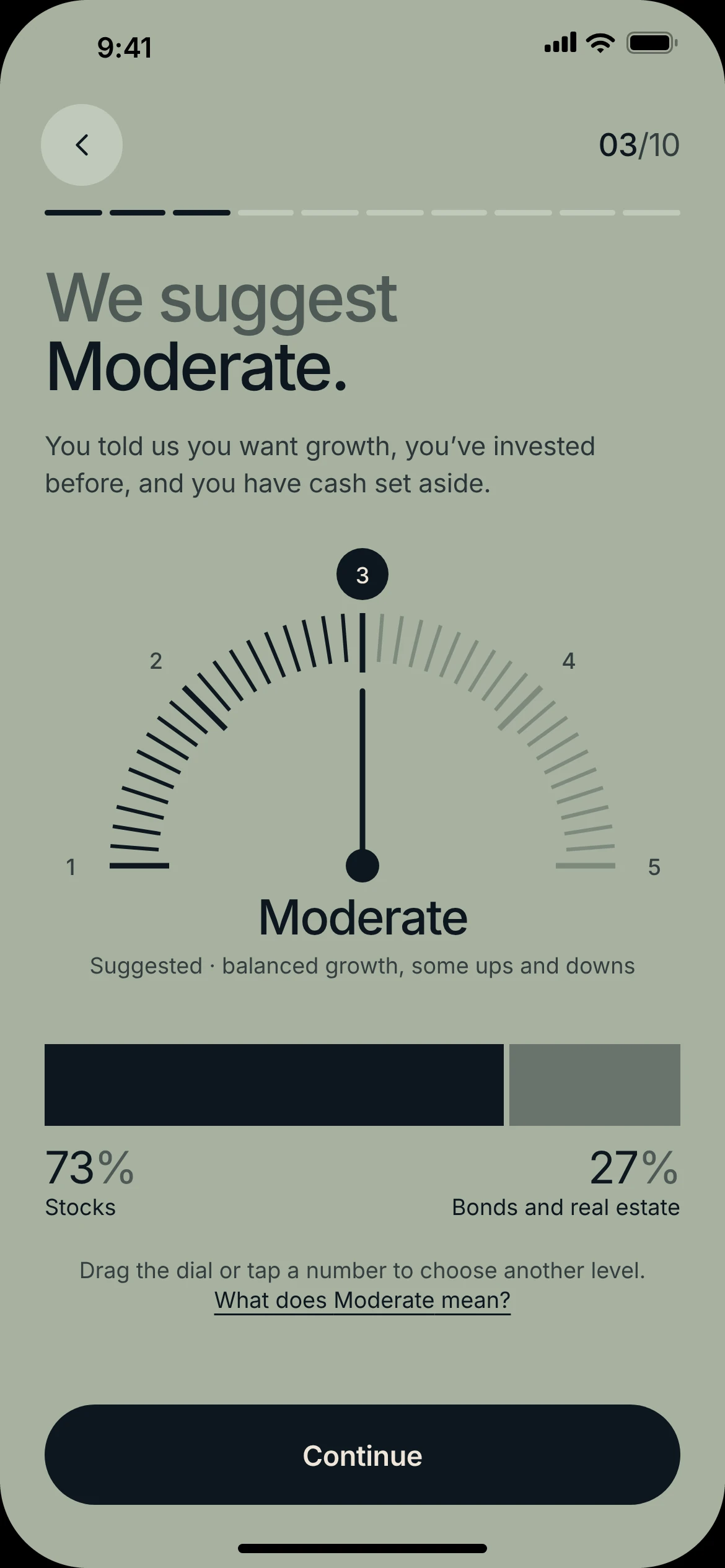
A suggested risk level with its reason, then in motion: the first deposit, your first split, and the review ticket that opens the account.
Color tells you where your answer lands.
My first pass put every screen on one neutral ground. It was calm and correct, and nothing told you what kind of moment you were in. I replaced it with a rule.
Paper is for questions about you. A choice that shapes your money is shown in the color of the tab where you’ll see the result: risk on sage because it lands in Portfolio, goals on mustard, values on mauve, account type on clay for Home. Ink is for security, the camera and money moving. Stone means you’re waiting on us.
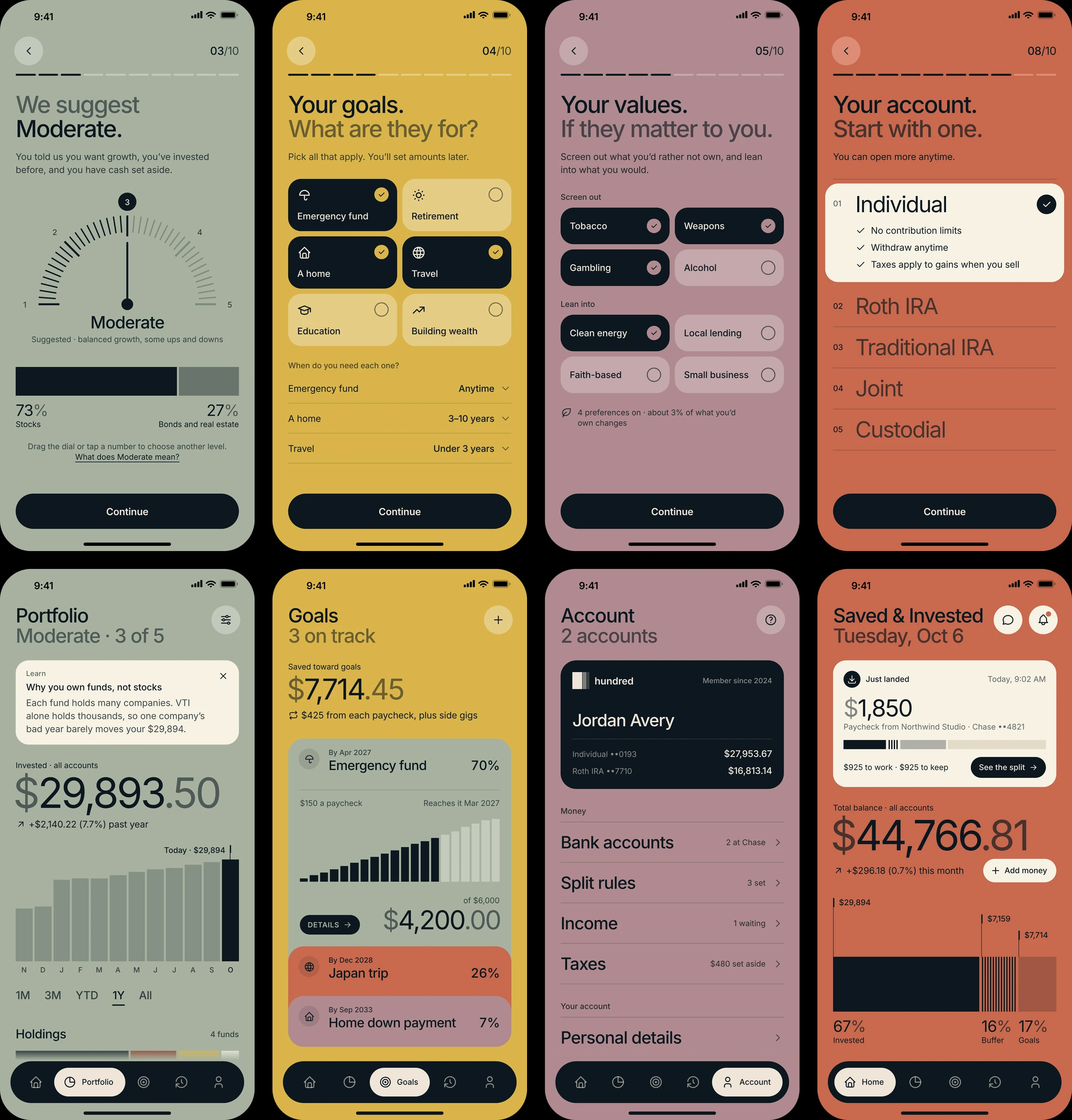
In motion · steps 2 to 6
Each Continue blends one ground into the next: paper for how you get paid, sage for risk, mustard for goals, mauve for values, then back to paper for legal details. Adding Retirement opens its own timing row right away.
Tradeoff: color stops being free to use for decoration, and each ground needs its own contrast limits (see Accessibility).
When ID needs help, say what to do next.
ID checks fail for different reasons, and they shouldn’t all be explained the same way. Glare on a scan is the member’s to fix, so that screen says exactly what to change. A mismatch between the ID and the details entered is different: the screen doesn’t say which detail failed, so a stolen identity can’t be tested against it one field at a time.
Either way there’s a next step. The member can check their details or send the ID to a person, and setup continues while it’s reviewed. The waiting screen is the only one on stone.
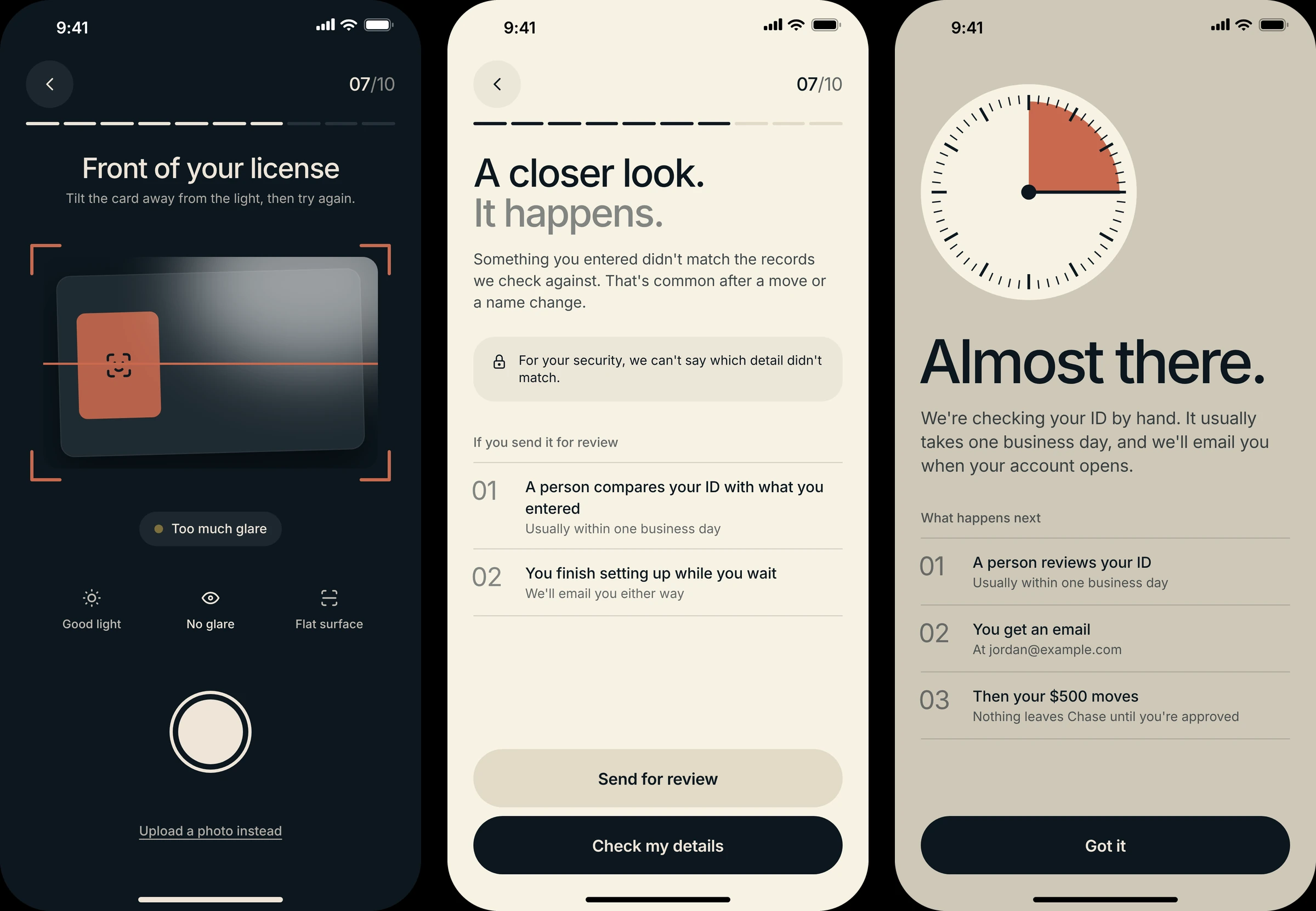
Tradeoff: an honest member with a typo gets a less specific message. I chose that over telling someone using another person’s ID which field to fix.
Money moving gets a receipt.
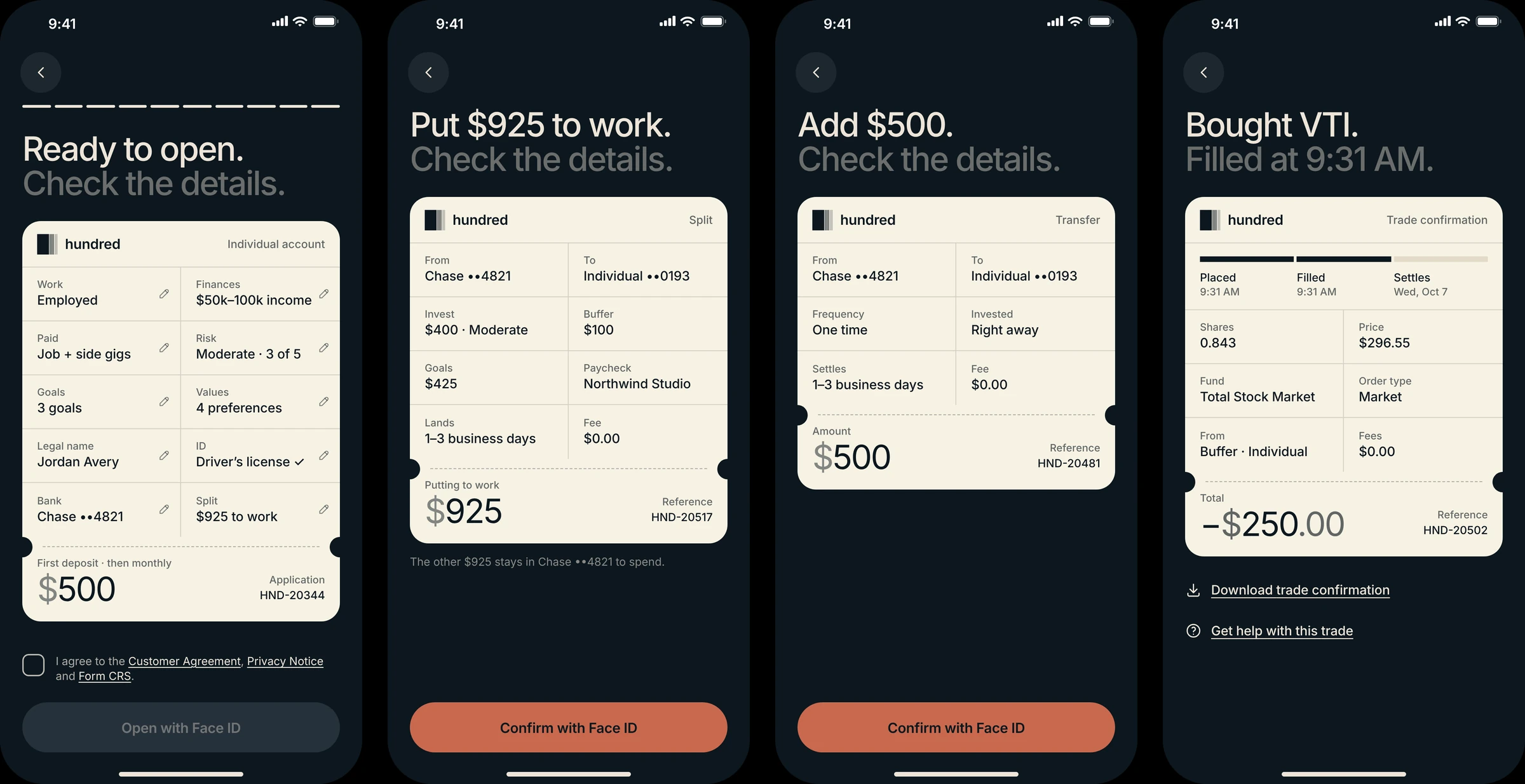
Every time money moves, the member sees the same three things: what will happen, a confirmation they have to give, and a record of it. A paycheck split, a transfer, a trade and moving tax money out all use one ticket.
Money moves on ink, with a keypad instead of the system keyboard. The ticket shows the from and to accounts, timing and fee, and it’s confirmed with Face ID.
After that, three things happen on their own clocks, and the receipt keeps them apart. The transfer starts and shows in Activity as Pending. Money added is invested right away up to $1,000, or when it settles if it’s more. It settles in one to three business days, and the receipt ticks off each step. That’s why the done screen can say “On its way” and “It’s invested now” at once.
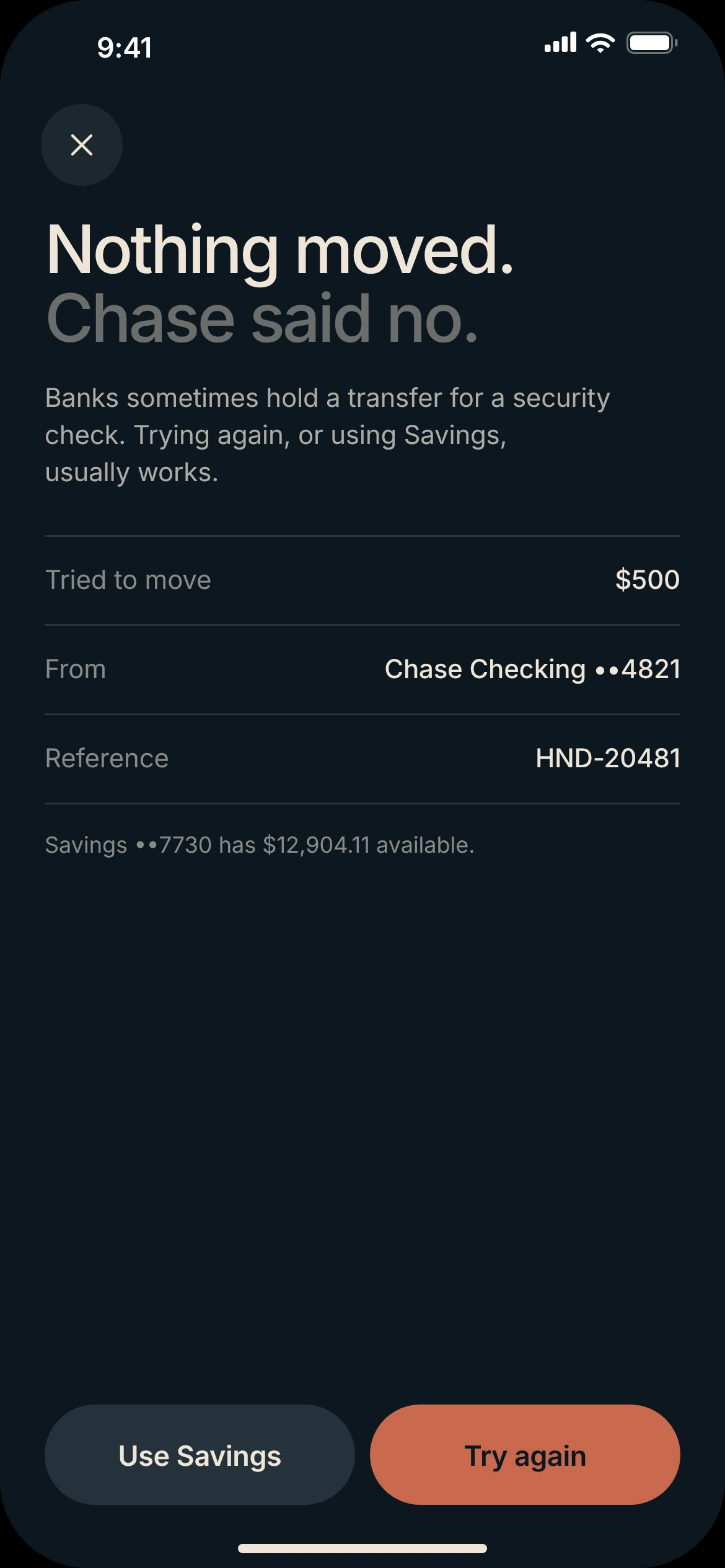
In motion: add $750 from Home through to Activity. When a transfer fails, the screen gives the reason, a reference number and two ways forward.
Five tabs, one set of rules.
Each tab has its own ground: Home clay, Portfolio sage, Goals mustard, Activity paper, Account mauve. The color changes and the rules don’t. Saved months are solid and projected months are in the ground’s lighter tone, money that isn’t there yet. Activity is a ledger with neutral rows, so a dividend and a deposit read as entries, not alerts. Account holds the rules behind payday: a split rule for each kind of income, income labels, taxes, the membership and what AI can see.
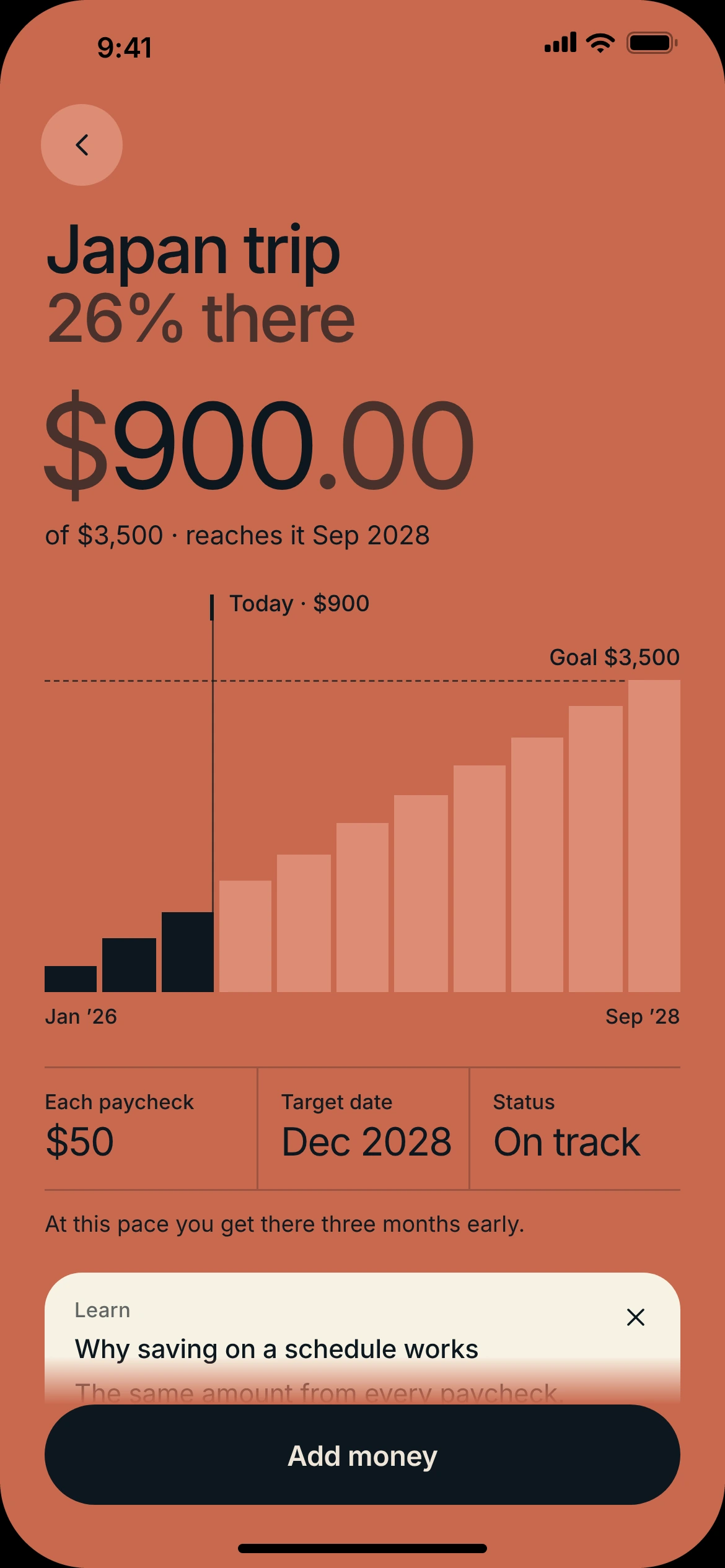
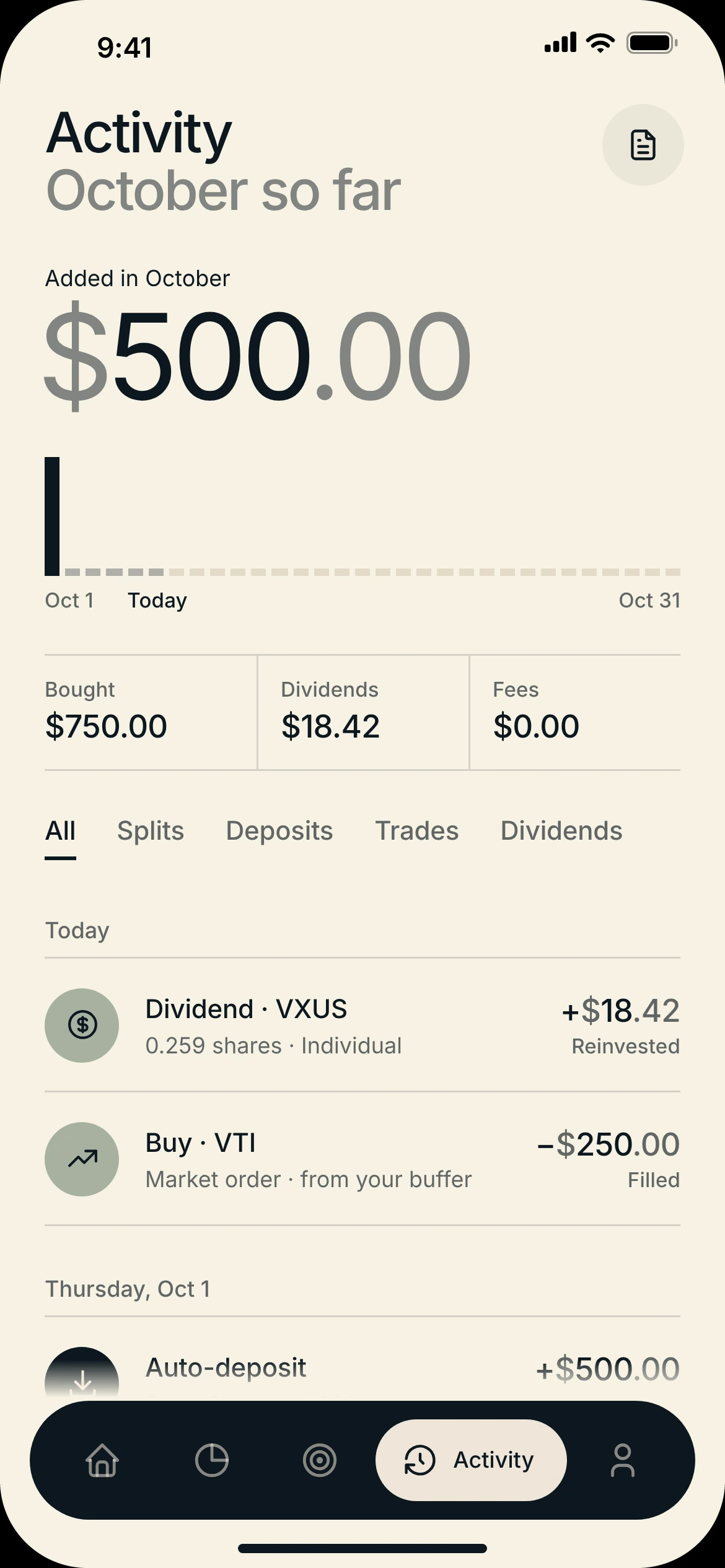
A goal’s months, saved and projected, against its target line. Activity opens with what came in this month, then a ledger with neutral rows.
In motion · a new goal
The amount per paycheck recalculates with every digit, so the cost of a bigger target is visible before you commit. The review is the same ticket, and it says the amount will come from future paycheck splits. How a new goal makes room in an existing split is still open. The new goal lands in the stack already open, at 0%: no solid months yet, only the ones to come.
Goals took the most rounds. Bands with one big percentage each read as a chart but not as things you own. The version that stuck is a wallet: every goal is its own card, tucked under the next, with an icon, its date, its name and how far along it is. One card is open at a time and shows its months, what each paycheck adds and the amount saved.
Here color is identity, not meaning. Each goal keeps its card color for life, and its page opens in that color: the open card grows to fill the screen, and the page arrives on the same ground. Status only shows when something needs attention: behind, paused, or not started yet.
In motion · the goal stack
Tap a card and it opens in place while the last one closes. Tap the open card and it grows into the goal’s page, keeping its color. Nothing jumps to a new screen color you didn’t choose.
Tradeoff: goal colors bend the ground rule, since sage, mauve and clay are also tab colors. Inside Goals I let identity win: a goal you saved toward for two years should look like itself everywhere.
Contrast limits, ground by ground.
Seven grounds means seven sets of contrast limits. Each ground has its own lowest passing opacity for small text, body text, large text and lines, and every dimmed element uses them instead of a single global gray.
| Ground | Used for | Lowest opacity for small ink text | Full ink contrast |
|---|---|---|---|
| Paper | Questions about you · Activity · Ask | 61% | 16.2:1 |
| Stone | Waiting on us | 66% | 10.9:1 |
| Mustard | Goals | 69% | 9.1:1 |
| Sage | Risk · Portfolio | 72% | 8.2:1 |
| Mauve | Values · Account | 82% | 5.9:1 |
| Clay | Account type · Home · Buffer · Taxes | 94% | 4.9:1 |
| Ink | Security · money moving · the split (light text) | 52% | 14.6:1 |
On clay, small secondary text is effectively full ink, so hierarchy there comes from size and weight rather than fading. An automated check of text contrast across 81 key screens finds no failures against WCAG 2.2 AA, and the layouts were checked on short phones down to 375 × 548. Icon buttons, the risk dial and amounts have spoken labels, focus is visible, and Reduce Motion turns transitions off. It hasn’t been tested with VoiceOver users.
The system
What the iterations taught me.
The first full pass passed every check: consistent type, correct contrast, one calm neutral ground. It was also flat, and every screen read as the same form. The fix was scale and commitment: one big shape or color per screen, small labels against very large numbers, and a few pieces repeated with purpose, like the ticket, the goal wallet and the keypad.
Correct isn’t the same as clear.
Restraint without contrast made every moment look equally important. The fix wasn’t decoration. It was giving each screen one thing to look at, and making color mean something.
The bigger change came after that. A careful sign-up and a good-looking balance weren’t a reason to open the app, so the second version was rebuilt around the paycheck. That idea carries the product, and it’s the part that most needs testing.
Three questions come first. Do people understand a suggested split well enough to approve it, or do they approve without reading it? Do they see the buffer and their goals as different kinds of money? And can they tell approved, pending and completed money apart on the done screen, the receipt and in Activity?